0 ratings

Item #:
21203141
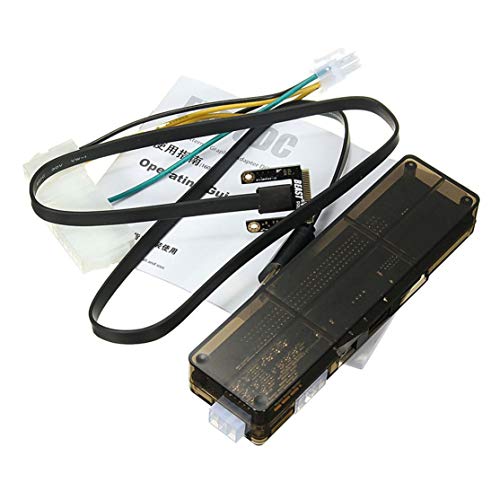
Professional V8.0 EXP GDC Beast Laptop External Independent Video Card Dock Mini PCI-E Graphics Card for Notebook
Item #:
21203141
XAF 151450
Price Details
Excluding Shipping & Custom charges ( Shipping and custom charges will be calculated on checkout )
*All items will import from US
0 ratings
Write a review
Out of stock
 Imported from USA store
Secured transaction
Ubuy works hard to protect your security and privacy. Our advanced payment security system ensures confidentiality by encrypting your information during transmission using AES (Advanced Encryption Standards) and SSL (Secure Socket Layer) protocols. Your payment details are 100% secure as we do not share your payment details with third party sellers.
Our Top Logistics Partners


Fast
Shipping

Free
Return*

Secure Packaging

100% Original Products

PCI DSS Compliance

ISO 27001 Certified


Note: Step Down Voltage Transformer required for using electronics products of US store (110-120). Recommended power converters Buy Now.


What Stands Out
Enhanced Graphics
Transform your notebook into a high-performance gaming machine with the Professional V8.0 EXP GDC Beast, offering superior graphics capabilities and smooth frame rates for an immersive gaming experience.
Compact Design
The sleek and mini design of this external GPU dock ensures portability, making it easy to carry and set up anywhere, perfect for gamers and professionals on the move.
Easy Compatibility
With support for various laptop models via Mini PCI-E, the GDC Beast allows effortless connectivity and versatility, addressing users' frustrations with upgrading graphics efficiently.
Product Details
| Item Weight | 3.5 lbs (1.59 kg) |
Who Should Buy?

-
Gaming Enthusiasts
Those seeking enhanced graphics performance for gaming on their laptops will benefit significantly from this external GPU setup.
-
Graphic Designers
Professional designers needing superior graphics processing capabilities can utilize the external card for improved workflow and rendering.
-
Video Editors
Editors working on high-resolution video projects can take advantage of the additional GPU power for faster rendering and playback.

-
Casual Users
Individuals who only use their laptops for web browsing and basic tasks will not need this external graphics solution.
-
Portability Seekers
Users needing a highly portable solution will find the fixed setup and additional hardware cumbersome to carry.
-
Budget-Conscious Buyers
Those on a tight budget may find the costs associated with an external GPU setup to be prohibitive.
Product Description
Professional V8.0 EXP GDC Beast Laptop External Independent Video Card Dock Mini PCI-E Graphics Card for Notebook
Have any Query? Chat with us
Customer Questions & Answers
-
Question:
What is the purpose of the Professional V8.0 EXP GDC Beast Laptop External Independent Video Card Dock?
Answer: The Professional V8.0 EXP GDC Beast is designed to enhance your laptop's graphics capabilities by enabling the use of a desktop GPU. This is particularly useful for gamers, graphic designers, and video editors who require superior graphics performance not typically available in standard laptops. By connecting a high-performance GPU, users can experience better gameplay, faster rendering, and overall improved graphics processing. -
Question:
How do I connect the EXP GDC Beast to my laptop?
Answer: Connecting the EXP GDC Beast to your laptop involves a few straightforward steps. First, ensure that your laptop has a Mini PCI-E slot. You then install your external GPU in the dock, connect the dock to your laptop via the Mini PCI-E interface, and finally, power it on. This connection allows for direct communication between your laptop and the external graphics card, significantly boosting your graphics performance. -
Question:
What types of graphics cards are compatible with the EXP GDC Beast?
Answer: The EXP GDC Beast is compatible with a wide range of desktop graphics cards, including popular options from NVIDIA and AMD. This flexibility allows users to select a card that best fits their performance needs and budget. For instance, if you're looking to play the latest AAA games or run graphic-intensive applications, you can opt for more powerful GPUs, while casual users might choose something less demanding. -
Question:
Can the EXP GDC Beast support 4K displays?
Answer: Yes, the Professional V8.0 EXP GDC Beast can support 4K displays, provided you connect it to a compatible graphics card that has 4K output capabilities. This makes it an excellent choice for professionals and gamers looking to leverage high-resolution displays for an enhanced visual experience. This is particularly beneficial for video editing and gaming, where clarity and detail are paramount. -
Question:
What are the power requirements for using the EXP GDC Beast?
Answer: The EXP GDC Beast requires an external power supply to function effectively. Depending on the specifications of your attached graphics card, you may need a power supply that provides adequate wattage. Users should check the requirements of their specific GPU to ensure the dock operates reliably and delivers optimum performance, particularly during high-demand tasks like gaming or rendering. -
Question:
Is there any software needed to use the EXP GDC Beast?
Answer: Generally, no specialized software is required to operate the EXP GDC Beast. Most modern operating systems will automatically recognize the external graphics card once connected. However, users might want to install the latest drivers for their specific GPU and any performance-enhancing software provided by the GPU manufacturer to maximize both compatibility and performance. -
Question:
What is the maximum bandwidth supported by the EXP GDC Beast?
Answer: The EXP GDC Beast supports a maximum bandwidth that is determined by the Mini PCI-E interface being used. Typically, it can handle up to PCIe 2.0 x1 for optimal data transfer between the laptop and the graphics card. While this will generally suffice for many applications, users looking for advanced performance might consider the PCIe 3.0 option, if available, for higher data throughput. -
Question:
Can the EXP GDC Beast be used with any laptop?
Answer: The EXP GDC Beast is designed to work with laptops that have a Mini PCI-E slot, which is commonly found in gaming and high-performance notebooks. However, users should check their laptop specifications to confirm compatibility before purchasing. Laptops without this slot may not support the connection, limiting the use of the dock for those models. -
Question:
What are the main benefits of using an external GPU like the EXP GDC Beast?
Answer: Using an external GPU with the EXP GDC Beast can provide significant performance boosts to laptops that otherwise struggle with graphic-intensive tasks. Benefits include improved gaming quality, faster rendering times in design applications, and the ability to upgrade graphics capabilities without purchasing a new laptop. This is especially valuable for users needing mobility without sacrificing workstation-level performance. -
Question:
Where can I buy the Professional V8.0 EXP GDC Beast Laptop External Independent Video Card Dock in Central African Republic?
Answer: You can purchase the Professional V8.0 EXP GDC Beast from Ubuy in Central African Republic. Ubuy is a trusted online retailer that offers a diverse range of electronics, making it a convenient choice for acquiring the EXP GDC Beast. With a user-friendly interface and comprehensive product descriptions, Ubuy ensures a straightforward shopping experience for all customers.
Quanna Editorial Review
No editorial reviews found
Customer Reviews & Ratings
1 customers ratings
-
5 Star
100%
-
4 Star
0%
-
3 Star
0%
-
2 Star
0%
-
1 Star
0%
Review this product
Share your thoughts with other customers
Product Price History
Important information
- Limitations : For products shipped internationally, please note that any manufacturer warranty may not be valid; manufacturer service options may not be available; product manuals, instructions, and safety warnings may not be in destination country languages; the products (and accompanying materials) may not be designed in accordance with destination country standards, specifications, and labeling requirements; and the products may not conform to destination country voltage and other electrical standards (requiring use of an adapter or converter if appropriate). The recipient is responsible for assuring that the product can be lawfully imported to the destination country. When ordering from Ubuy or its affiliates, the recipient is the importer of record and must comply with all laws and regulations of the destination country.
- Not all the products listed on Ubuy are for sale, as Ubuy is a global search engine. Products are subject to export/trade regulations.
XAF 151450
Currently unavailable.
We don't know when or if this item will be back in stock.
This item is not restrict in my country.(Please click on above link if this item is not restrict in your country, So our team will review and allow.)
Secured transaction
Ubuy works hard to protect your security and privacy. Our advanced payment security system ensures confidentiality by encrypting your information during transmission using AES (Advanced Encryption Standards) and SSL (Secure Socket Layer) protocols. Your payment details are 100% secure as we do not share your payment details with third party sellers.
Our Top Logistics Partners
Fastest cross-border delivery