0 ratings

Item #:
103483000
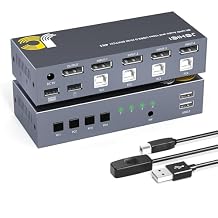
KVM Switch DisplayPort 8K@60Hz, 4 Way DP KVM Switcher for 4 Computer Share 1 HD Monitor and USB Keyboard Mouse, with 4 USB Cable & Wired Remote
Item #:
103483000
XAF 58494
Price Details
Excluding Shipping & Custom charges ( Shipping and custom charges will be calculated on checkout )
*All items will import from US
0 ratings
Write a review
In stock
 Imported from USA store
QTY:
Order now and get it around Friday, July 03
Secured transaction
Ubuy works hard to protect your security and privacy. Our advanced payment security system ensures confidentiality by encrypting your information during transmission using AES (Advanced Encryption Standards) and SSL (Secure Socket Layer) protocols. Your payment details are 100% secure as we do not share your payment details with third party sellers.
Our Top Logistics Partners


Say goodbye to messy desks and enjoy convenience and comfort.

Fast
Shipping

Free
Return*

Secure Packaging

100% Original Products

PCI DSS Compliance

ISO 27001 Certified


Note: Step Down Voltage Transformer required for using electronics products of US store (110-120). Recommended power converters Buy Now.


What Stands Out
High-Resolution Support
Deliver stunning visuals with 8K@60Hz support, ensuring crisp image quality and smooth performance for gaming, graphic design, and video editing.
Multiple Device Connectivity
Easily switch between four computers using a single HD monitor and USB keyboard/mouse, simplifying workspace and reducing clutter for a more organized setup.
Convenient Remote Control
The included wired remote allows for quick switching between devices, enhancing user convenience and workflow efficiency without the hassle of manual toggling.
Product Details
| Item Weight | 2.5 lbs (1.13 kg) |
Who Should Buy?

-
Gamers
Supports high refresh rates and 8K resolution, making it ideal for gaming setups with multiple computers.
-
Professional Workers
Perfect for multitasking professionals who need to switch between multiple computers without hassle.
-
Tech Enthusiasts
Great for users who enjoy configuring and customizing their tech setups for enhanced productivity and performance.

-
Casual Users
Users with basic computing needs may find this KVM switch too complex or unnecessary for their setup.
-
Budget-Conscious Buyers
Individuals looking for low-cost options may find this high-end switch more than they need for basic tasks.
-
Low-Resolution Tasks
Users working exclusively with low-resolution applications will not benefit from the 8K capabilities this switch offers.
Product Description
KVM Switch DisplayPort 8K@60Hz, 4 Way DP KVM Switcher for 4 Computer Share 1 HD Monitor and USB Keyboard Mouse, with 4 USB Cable & Wired Remote
Have any Query? Chat with us
Customer Questions & Answers
-
Question:
What is a KVM switch and how does it benefit users?
Answer: A KVM switch, or Keyboard, Video, and Mouse switch, allows users to control multiple computers from a single set of peripherals. This is particularly beneficial for those who manage several systems simultaneously, such as IT professionals or gamers. By using a KVM switch, you can easily toggle between computers without the hassle of multiple keyboards and monitors, ensuring a streamlined workspace and improved efficiency. -
Question:
What does 8K@60Hz mean in the context of this KVM switch?
Answer: The term 8K@60Hz refers to the maximum display resolution and refresh rate supported by the KVM switch. This means it can handle an ultra-high-definition video output of 7680 x 4320 pixels at a smooth refresh rate of 60 frames per second. This capability is ideal for graphic design, video editing, and high-performance gaming, providing a crisp and clear display that enhances the visual experience. -
Question:
Can I use this KVM switch with different operating systems?
Answer: Yes, the KVM switch is designed to be compatible with various operating systems, including Windows, macOS, and Linux. This versatility allows users to switch between different systems seamlessly without worrying about software conflicts. Whether you're using it for personal PCs, workstations, or servers, you can be confident that the switch will work across different platforms. -
Question:
How does the wired remote control work with the KVM switch?
Answer: The wired remote control allows users to switch between connected computers easily by simply pressing a button. This eliminates the need to access the KVM switch directly, enhancing convenience and accessibility. It's especially useful in scenarios where the switch might be placed in a hard-to-reach location, making it easier to manage your devices without disrupting your workflow. -
Question:
What peripherals are compatible with the KVM switch?
Answer: The KVM switch is compatible with standard USB keyboards and mice, ensuring that most peripherals on the market can be used. As a result, whether you use mechanical keyboards, gaming mice, or standard office devices, you can connect them to the KVM switch. This flexibility allows users to customize their setup according to their personal preferences and needs. -
Question:
How many computers can I connect to this KVM switch?
Answer: This KVM switch supports up to four computers, allowing you to share one HD monitor and USB peripherals among multiple systems. This is particularly advantageous for users with limited desk space or those who need to manage several machines without clutter. You can easily switch between different computers for tasks like gaming, programming, or office work with just one set of peripherals. -
Question:
How do I set up the KVM switch with my devices?
Answer: Setting up the KVM switch is straightforward. Connect the provided USB cables from the switch to each computer's USB ports and connect your monitor via DisplayPort. Finally, plug in your keyboard and mouse to the designated USB ports on the switch. Once powered, you can use the remote control or button on the switch for seamless transitions between connected devices. -
Question:
Is there any latency when using the KVM switch?
Answer: Typically, using a high-quality KVM switch like this one results in minimal latency. This is crucial for activities that rely on real-time interaction, such as gaming or video editing. The switch is designed to transmit signals quickly, ensuring that there is virtually no delay when switching between computers. Users can effectively work or play without performance interruptions. -
Question:
What kind of video outputs are supported by this KVM switch?
Answer: The KVM switch primarily supports DisplayPort outputs, which offer higher resolutions and refresh rates compared to traditional HDMI connections. This feature is particularly advantageous for those using high-definition monitors, enabling support for 8K resolutions. Whether you're into graphic design, video production, or high-end gaming, this switch ensures a superior visual experience. -
Question:
Where can I buy the KVM Switch DisplayPort 8K@60Hz in Central African Republic?
Answer: You can purchase the KVM Switch DisplayPort 8K@60Hz at Ubuy. Ubuy is known for its extensive collection of tech gadgets and peripherals, ensuring you find the products you need with ease. Visit their website to explore your options and select the KVM switch that fits your needs best.
JCHICI KVM Switches Editorial Review
No editorial reviews found
Customer Reviews & Ratings
1 customers ratings
-
5 Star
0%
-
4 Star
100%
-
3 Star
0%
-
2 Star
0%
-
1 Star
0%
Review this product
Share your thoughts with other customers
Product Price History
Important information
- Limitations : For products shipped internationally, please note that any manufacturer warranty may not be valid; manufacturer service options may not be available; product manuals, instructions, and safety warnings may not be in destination country languages; the products (and accompanying materials) may not be designed in accordance with destination country standards, specifications, and labeling requirements; and the products may not conform to destination country voltage and other electrical standards (requiring use of an adapter or converter if appropriate). The recipient is responsible for assuring that the product can be lawfully imported to the destination country. When ordering from Ubuy or its affiliates, the recipient is the importer of record and must comply with all laws and regulations of the destination country.
- Not all the products listed on Ubuy are for sale, as Ubuy is a global search engine. Products are subject to export/trade regulations.
XAF 58494
Order now and get it around Friday, July 03
This item is not restrict in my country.(Please click on above link if this item is not restrict in your country, So our team will review and allow.)
QTY:
Secured transaction
Ubuy works hard to protect your security and privacy. Our advanced payment security system ensures confidentiality by encrypting your information during transmission using AES (Advanced Encryption Standards) and SSL (Secure Socket Layer) protocols. Your payment details are 100% secure as we do not share your payment details with third party sellers.
Our Top Logistics Partners
Fastest cross-border delivery
Features & Benefits
- Control 4 computers with 1 keyboard, mouse, and monitor.
- Experience stunning 8K@60Hz visuals with HDR support.
- Five seamless switching modes for flexibility.
- Declutter your workspace for improved productivity.
- Premium metal housing in a compact design.
- Broad OS compatibility for smooth integration.