- Home Page /
- Electronics /
- Computer Accessories /
- Computer Accessories & Peripherals /
- Keyboards, Mice & Accessories /
- Mice /
- SANWA Bluetooth 5.1 + 2.4 G Wireless Ergonomi...
0 ratings

Item #:
87697715
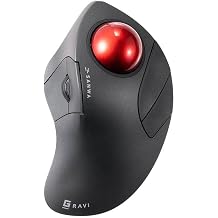
SANWA Bluetooth 5.1 + 2.4 G Wireless Ergonomic Trackball Mouse, Finger Control Roller Ball Mouse, 3 Device Switch, Silent Programmable Buttons,
Item #:
87697715
XAF 38928
Price Details
Excluding Shipping & Custom charges ( Shipping and custom charges will be calculated on checkout )
*All items will import from US
0 ratings
Write a review
In stock
 Imported from USA store
QTY:
Order now and get it around Sunday, July 05
Secured transaction
Ubuy works hard to protect your security and privacy. Our advanced payment security system ensures confidentiality by encrypting your information during transmission using AES (Advanced Encryption Standards) and SSL (Secure Socket Layer) protocols. Your payment details are 100% secure as we do not share your payment details with third party sellers.
Our Top Logistics Partners


Experience seamless precision and comfort with an ergonomic design that fits your hand perfectly and reduces muscle pain.

Fast
Shipping

Free
Return*

Secure Packaging

100% Original Products

PCI DSS Compliance

ISO 27001 Certified


Note: Step Down Voltage Transformer required for using electronics products of US store (110-120). Recommended power converters Buy Now.


What Stands Out
Multi-Device Switching
Effortlessly connect and switch between three devices, enhancing productivity and convenience for users who work across multiple platforms seamlessly.
Customizable Buttons
Programmable silent buttons provide personalized functionality, allowing users to tailor commands, which ultimately boosts efficiency and enhances the computing experience.
High Precision
Adjustable DPI settings (1000/1600/2400) deliver tailored sensitivity for precise control, catering to both casual users and professionals needing accuracy in their tasks.
Product Details
| Item Weight | 0.6 lbs (270 grams) |
Who Should Buy?

-
Office Workers
Ideal for desktop users seeking comfort and reducing wrist strain during long hours of work.
-
Graphic Designers
Benefits users needing precision control for detailed work, enhancing productivity with customizable buttons.
-
Gamers
Perfect for gamers wanting quick device switching and responsive controls without loud click sounds.

-
Casual Users
May feel unnecessary for users who only perform basic tasks and are not sensitive to ergonomics.
-
Traditional Mouse Fans
Users who prefer conventional mice may find the trackball design uncomfortable or awkward to transition.
-
Portable Users
Not suitable for users needing a lightweight and compact option for frequent travel or mobile use.
Product Description
SANWA Bluetooth 5.1 + 2.4 G Wireless Ergonomic Trackball Mouse, Finger Control Roller Ball Mouse, 3 Device Switch, Silent Programmable Buttons, 1000/1600/2400 DPl, Compatible with PC, Windows, MacOS
Have any Query? Chat with us
Customer Questions & Answers
-
Question:
What are the key features of the SANWA Wired Ergonomic Trackball Mouse?
Answer: The SANWA Wired Ergonomic Trackball Mouse features an optical rollerball design with a 44mm trackball for smooth navigation. It includes programmable silent buttons to minimize noise during use, making it ideal for quiet work environments. Additionally, this trackball mouse offers adjustable DPI settings of 600, 800, 1200, and 1600, which allows users to customize cursor sensitivity based on their preferences. This combination of features makes it perfect for tasks such as graphic design, gaming, or any activity requiring precision. -
Question:
How does the ergonomic design of this mouse benefit users?
Answer: The ergonomic design of the SANWA Wired Trackball Mouse helps reduce strain on the wrist and hand, making it suitable for prolonged use. Unlike traditional mice that require wrist movement, this trackball allows finger movement, which can enhance comfort and prevent repetitive strain injuries. Users in office settings or those engaged in creative work will find it beneficial as it promotes better posture and diminishes fatigue during extended periods of work. -
Question:
Is the SANWA Wired Trackball Mouse compatible with all operating systems?
Answer: Yes, the SANWA Wired Trackball Mouse is designed to be compatible with multiple operating systems, including Windows and macOS. This broad compatibility ensures that users can seamlessly integrate the mouse with their computers, regardless of the operating system in use. Whether you’re engaging in casual browsing or professional tasks, this mouse adapts well to your system configuration, making it a versatile choice for various users. -
Question:
Can the buttons on the SANWA Wired Trackball Mouse be customized?
Answer: Absolutely! The SANWA Wired Trackball Mouse features programmable buttons, allowing users to customize their functions according to their needs. This means you can assign specific commands or shortcuts, enhancing your workflow and productivity. For instance, graphic designers might program buttons for frequently used tools, while gamers can assign critical actions, making it a versatile option for different applications. -
Question:
What makes the silent buttons advantageous?
Answer: The SANWA Wired Trackball Mouse incorporates silent buttons, which significantly reduce click noise. This feature is particularly advantageous in shared workspaces, libraries, or during presentations where noise distraction should be minimized. Users will appreciate the discreet click action that maintains focus and prevents disruption for others nearby, making it an ideal choice for professional environments. -
Question:
How does the adjustable DPI feature improve usability?
Answer: The adjustable DPI settings of the SANWA Wired Trackball Mouse enhance usability by allowing you to switch between different sensitivity levels based on your tasks. Lower DPI settings offer precise control for detailed work, such as graphic design, while higher DPI settings enable faster movements for gaming or general browsing. This adaptability caters to diverse user needs, promoting an optimized experience across various applications. -
Question:
What types of users benefit most from the SANWA Wired Trackball Mouse?
Answer: The SANWA Wired Trackball Mouse is particularly beneficial for graphic designers, gamers, and professionals who require precision and comfort in their everyday tasks. Its ergonomic design is great for users prone to wrist pain or fatigue, while its programmable functionality appeals to those looking to streamline their workflow. Additionally, anyone who spends long hours on the computer will find the trackball mouse enhances their productivity and comfort during use. -
Question:
How do you clean and maintain the SANWA Wired Trackball Mouse?
Answer: Cleaning the SANWA Wired Trackball Mouse is essential for maintaining its performance. Regularly remove any dust or debris from the trackball area with a soft cloth. For deeper cleaning, you can gently pop out the trackball and clean it alongside its housing. This care ensures smooth operation and responsiveness, extending the life of your mouse and keeping it functioning at its best for an extended period. -
Question:
Where can I buy the SANWA Wired Ergonomic Trackball Mouse?
Answer: You can purchase the SANWA Wired Ergonomic Trackball Mouse from Ubuy. Ubuy provides a wide selection of tech products and is a reliable platform for buying electronics. By visiting Ubuy and searching for the SANWA Wired Trackball Mouse, you can conveniently explore product specifications, user reviews, and additional details to help with your decision. -
Question:
What is the ideal workspace setup for using the SANWA Wired Trackball Mouse?
Answer: The ideal workspace setup for the SANWA Wired Trackball Mouse includes a comfortable chair and a desk that allows for an ergonomically sound posture. The mouse should be positioned close to your keyboard to minimize overreaching. Ambient lighting should reduce glare on your screen, allowing you to focus better. With this careful setup, users can optimize their comfort and efficiency, particularly during long working sessions.
SANWA Mice Editorial Review
No editorial reviews found
Customer Reviews & Ratings
1 customers ratings
-
5 Star
100%
-
4 Star
0%
-
3 Star
0%
-
2 Star
0%
-
1 Star
0%
Review this product
Share your thoughts with other customers
Product Price History
Important information
- Limitations : For products shipped internationally, please note that any manufacturer warranty may not be valid; manufacturer service options may not be available; product manuals, instructions, and safety warnings may not be in destination country languages; the products (and accompanying materials) may not be designed in accordance with destination country standards, specifications, and labeling requirements; and the products may not conform to destination country voltage and other electrical standards (requiring use of an adapter or converter if appropriate). The recipient is responsible for assuring that the product can be lawfully imported to the destination country. When ordering from Ubuy or its affiliates, the recipient is the importer of record and must comply with all laws and regulations of the destination country.
- Not all the products listed on Ubuy are for sale, as Ubuy is a global search engine. Products are subject to export/trade regulations.
XAF 38928
Order now and get it around Sunday, July 05
This item is not restrict in my country.(Please click on above link if this item is not restrict in your country, So our team will review and allow.)
QTY:
Secured transaction
Ubuy works hard to protect your security and privacy. Our advanced payment security system ensures confidentiality by encrypting your information during transmission using AES (Advanced Encryption Standards) and SSL (Secure Socket Layer) protocols. Your payment details are 100% secure as we do not share your payment details with third party sellers.
Our Top Logistics Partners
Fastest cross-border delivery
Features & Benefits
- Ergonomic 25° design reduces wrist pain and stiffness.
- Trackball allows for finger control, minimizing wrist movement.
- Connects up to 3 devices simultaneously via Bluetooth 5.1 and 2.4G.
- Programmable buttons enhance work efficiency.
- Silent click feature is ideal for quiet environments.
- Compatible with various operating systems including Windows, MacOS, and iOS.